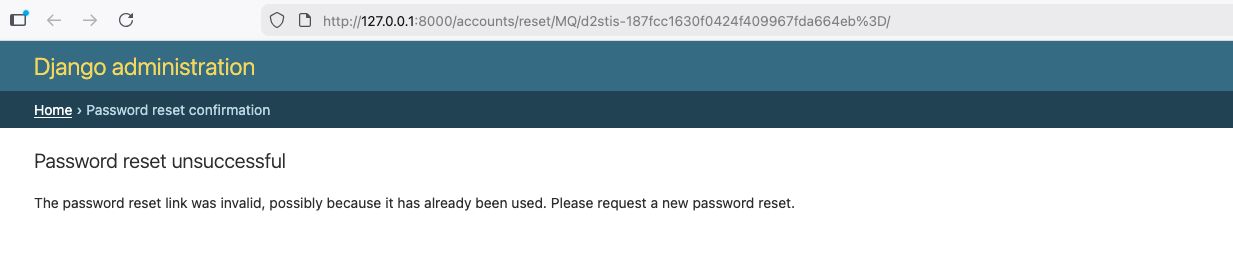
In Django 6, when using console or file email backend for development, navigating to the password reset URL generated by django might result in an invalid link error, even though the link is just being used for the first time. And requesting a new password reset does not fix the issue.
This tutorial assumes the following:
- You are using the Django auth backend.
-
Your project's
urls.pyincludes:path("accounts/", include("django.contrib.auth.urls")) -
In your project’s
settings, you are using either console email backend:or file email backend:EMAIL_BACKEND = "django.core.mail.backends.console.EmailBackend"EMAIL_BACKEND = "django.core.mail.backends.filebased.EmailBackend"
Possible fix:
Check the url you copied from the terminal or file and remove the equal sign character (=) towards the end of the url if present.
For example, let’s say our console displays this as our password reset url:
http://127.0.0.1:8000/accounts/reset/MQ/d2n4vc-99125510fc60163b2b209ebacdae44=
23/
Simply remove the "=" character towards the end of the url but leave the remaining part of the url like so:
http://127.0.0.1:8000/accounts/reset/MQ/d2n4vc-99125510fc60163b2b209ebacdae4423/
After that, the url should work as expected and the password reset form should be displayed in the browser.
Why is this happening?
Before we dive into why it’s happening, let me draw your attention to this:
If you look closely at the email content, assuming the default password reset email template is in use, you would see the text In case you=E2=80=99ve forgotten,. Here, the curly apostrophe character (’) is encoded as =E2=80=99.
Django 6 uses python’s modern email api to send emails and as a result, email is now encoded using quoted-printable, unlike Django 5, which encodes using 8bit.
The quoted-printable encoding adds line breaks when the maximum line length has been reached and encodes special characters like curly apostrophe. The "=" character at the end of the url indicate a soft line break, with the intent that the next line be joined with the text.
The encoded version of the email is shown in the console/file, which is why the encoded characters are part of the email content. Email clients like Gmail decode them before rendering. What you see in the console/file is similar to viewing an email source on Gmail.
But what if we want to see the original unencoded email content?
Well, one way to achieve this is using Django’s in-memory (locmem) email backend.
In your project’s settings, add/update to this:
EMAIL_BACKEND = "django.core.mail.backends.locmem.EmailBackend"
Note that the locmem backend is in-memory, hence the email content is held in the process. To test, let’s trigger the password reset from our shell.
In your terminal, open the python shell:
python manage.py shell
Copy this into the shell:
from django.contrib.auth.forms import PasswordResetForm
from django.core import mail


form = PasswordResetForm({"email": "[email protected]"})
form.is_valid()
form.save(
    request=None,
    use_https=False,
    domain_override="localhost:8000",
)
If an error occurs here, check to ensure that the email backend in your project’s settings is set to locmem.
Now run:
mail.outbox
Finally run:
mail.outbox[0].body
Assuming you are using the default password reset email template, you should see:
"\nYou're receiving this email because you requested a password reset for your user account at localhost:8000.\n\nPlease go to the following page and choose a new password:\n\nhttp://localhost:8000/accounts/reset/MQ/d2pxf7-cb51f999cfb25de2ff1d34d9f7378e9c/\n\nIn case you've forgotten, you are: [email protected]\n\nThanks for using our site!\n\nThe localhost:8000 team\n\n\n"
That is the original unencoded email content. You can also check the email subject with:
mail.outbox[0].subject
Note that console and file email backend are meant for development and testing purposes. In production apps, you would usually use an SMTP or custom email backends.